


VIN Scanner
3.6191.00 Reviews
App Specs
- Version
- 3.2.4
- Updated On
- License
- Free
- Downloads
- 100,000+
- Developer
- VIN Scanner
- Categories
- Auto & Vehicles
- Platform
- Android
Screenshots
 Analysis by AppCompare
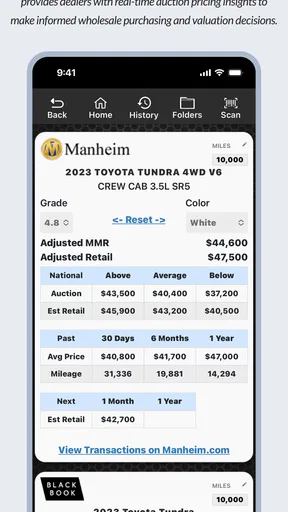
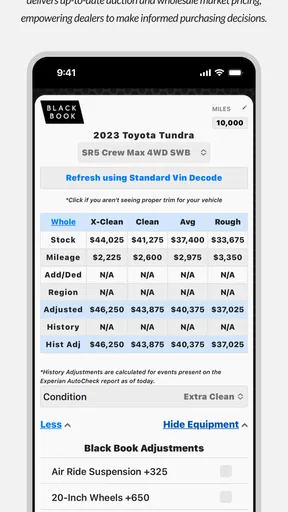
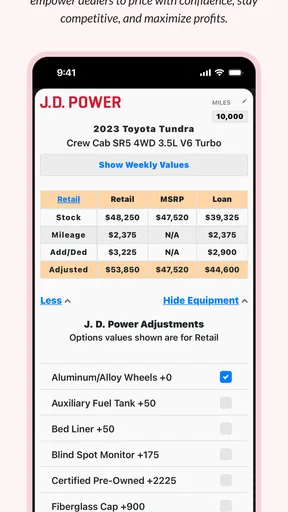
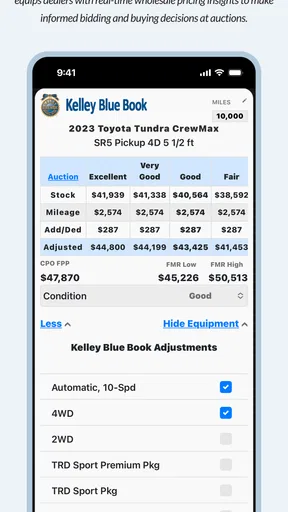
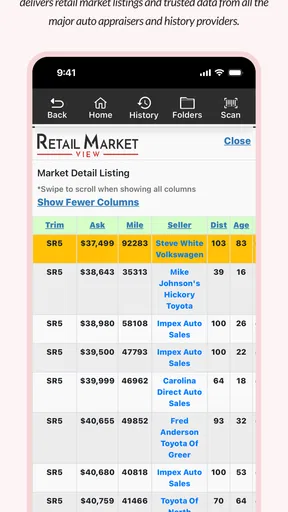
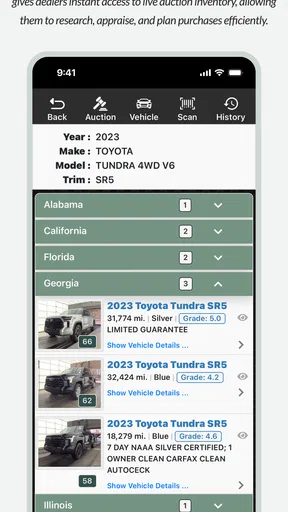
When I’m looking at a vehicle for appraisal or comparing cars at an auction, a VIN is a useful starting point—but only if I can capture and organize it quickly. VIN Scanner is a free Auto & Vehicles app from VIN Scanner, aimed at people who work with vehicle appraisals, auction run lists, and market research. Its average rating is 3.8 from around 550 ratings, and it has been installed over 100,000 times. That gives a sense of its reach, though I’d judge it by whether its workflow suits the way you evaluate cars.
What free access means in practice
The app is free, so trying it does not require an upfront purchase. That makes it easier to decide whether VIN-based tools fit your routine before relying on them. I would still separate “free to install” from “everything I might want is included”: the practical value depends on which functions are available in the version you use and whether they cover your appraisal needs.
That distinction matters if you are comparing it with paid vehicle-history services. A scanner can help capture and work with a VIN, but scanning is not automatically the same as buying a full history report. I would treat the app as a tool for organizing and assessing vehicle information, not as a substitute for every inspection or record check involved in a purchase.
Where it can save time
The strongest case for a dedicated VIN tool is a busy viewing day. If I’m checking several cars, typing every identification number into a separate search by hand is tedious and leaves more room for transcription errors. A scan-first workflow can make it easier to move from one vehicle to the next, while the app’s focus on appraisals, run lists, market insights, and profit points toward a more work-oriented use than casual curiosity alone.
A useful habit is to verify the captured VIN against the number on the vehicle before using it for a decision. This is especially sensible when the label is dirty, partly obscured, or reflecting light. A single incorrect character can send a lookup down the wrong path, so I would not treat a successful scan as proof that the number was read correctly.
For an independent buyer, the app may be most helpful as an early filter. I can capture a VIN while standing beside a car, note the information I want to investigate, and decide whether it is worth continuing with a seller conversation or arranging a proper inspection. It can make the first pass more orderly; it cannot tell me, by itself, whether a vehicle is mechanically sound or fairly priced.
How I’d use it during an appraisal
Imagine arriving at an auction with a short list of vehicles to inspect before bidding. I would scan each VIN as part of the initial walk-around, then match each result to the right car and keep the candidates distinct. That simple discipline helps avoid a common practical mistake: remembering a promising detail but attaching it to the wrong vehicle later in the day.
Worth Reading Before You Choose

EA SPORTS FC Mobile 26 Is a Bigger Football Game, but It Takes Time

Flipboard Shows What News Apps Must Do Beyond the Feed

Switching to Android Auto Means Rethinking Your Driving Routine

Google Calendar Makes a Crowded Week Easier to Manage

Ludo King Makes the Most of the Minutes Between Plans

Baby Panda World Brings Quick Play to Modern Phones, but Its Game Library Feels Busy
When judging a possible purchase, I’d use the app alongside the basics: inspect the car in person, compare the VIN on the vehicle with its paperwork, and ask for records or an independent mechanical check where appropriate. If the app helps me identify a point that needs clarification, that is valuable. If the result looks reassuring, I would still regard it as one input rather than a final verdict.
The Magic Behind VIN Scanner
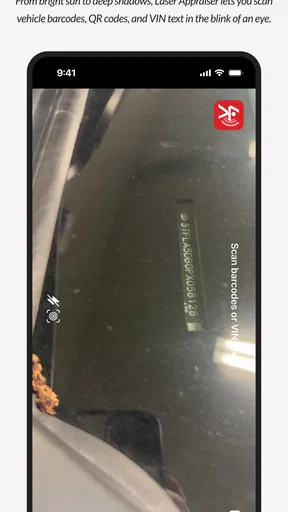
So, what's the big deal about this app? Well, at its core, it’s designed to scan and decode the VIN (Vehicle Identification Number) of any car. This number is like a car’s fingerprint, providing a treasure trove of information about the vehicle's history. With VIN Scanner, you simply point your camera at the VIN, and voila, the app does the rest. It’s like having a car detective in your pocket.
User Experience and Interface
The first thing you’ll notice after downloading the app is its sleek and intuitive interface. I mean, it practically walks you through the process. You don’t need to be a tech whiz to figure it out. The scanning feature is spot-on, and in my experience, it rarely takes more than a few seconds to capture the VIN. Plus, the app provides detailed instructions for those tricky VIN placements that might be hard to reach or read.
Once the VIN is scanned, the magic happens. The app pulls up detailed information about the car, including its make, model, year, engine type, and much more. It’s comprehensive, and for a car enthusiast like myself, it’s like opening a treasure chest of information.
Data Accuracy and Reliability
Let’s talk about the accuracy of the data. In my experience, VIN Scanner has been remarkably reliable. The information matched the official car records, which is a huge relief when you’re about to make a significant purchase. The app sources its data from reputable databases, ensuring you’re getting the most accurate snapshot of the vehicle’s history.
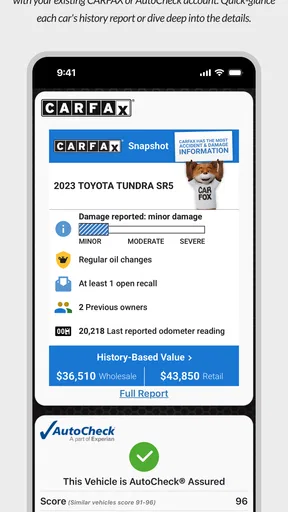
One of the standout features is the app’s ability to flag potential red flags in a car’s history. This includes accidents, recalls, and even odometer fraud. It’s like having a second pair of eyes that don’t miss a thing.
Additional Features Worth Mentioning
Besides the core VIN scanning, the app also offers features like saving searches, which is a lifesaver if you’re comparing multiple vehicles. You can even share the information with others, which is great if you have a second opinion to consider.
Another nifty feature is the ability to manually enter a VIN. Sometimes, the camera might have trouble with certain lighting conditions or angles, and having this option ensures you’re never stuck.
Why You Should Consider VIN Scanner
So, who would benefit from using this app? In my opinion, anyone in the market for a used car should have VIN Scanner as part of their toolkit. It’s also an excellent resource for car enthusiasts and professionals who deal with vehicle data regularly.
The app is available for Android and iOS, and it’s pretty lightweight, so it won’t clog up your phone's storage. Plus, it offers a free version with essential features, and a premium version for those who want more detailed reports.
All in all, VIN Scanner delivers on its promise to make vehicle history accessible and easy to understand. It’s user-friendly, accurate, and incredibly convenient. Whether you’re buying, selling, or just curious about a vehicle, this app is a must-have. You can check it out and download it directly from the App Store or Google Play.
Happy car hunting!
What to check before relying on a result
Even when a scan is quick, the quality of the result depends on the quality of the input. I’d try to position the camera squarely over the VIN and give it enough light to distinguish similar-looking characters. If the camera struggles, manual entry is a practical fallback, but I would read the number back against the physical plate before continuing. This is a small step that can prevent a bigger mix-up when several vehicles are being considered.
I would also keep the purpose of a VIN lookup in perspective. A decoded vehicle identity can help confirm that a listing describes the car in front of me, and history flags can point toward questions worth asking. Neither should replace a test drive, a mechanic’s inspection, or a careful review of ownership and maintenance documents. For a high-stakes purchase, the app is a useful part of due diligence, not due diligence by itself.
Where it differs from general car tools
Compared with a general car-shopping app, a VIN-focused tool is useful at the point where a specific vehicle needs checking rather than when I’m browsing broad listings. Compared with a paper checklist or a notes app, scanning and saving searches can keep vehicle details together and make comparisons less dependent on memory. Those alternatives can still be better if I mainly want to track budgets, schedule a test drive, or store inspection notes without looking up vehicle data.
It is also worth distinguishing this kind of app from a professional appraisal platform or a dedicated paid history-report service. The emphasis on appraisals, run lists, market insight, and profit suggests a more focused workflow than a generic decoder, but users should choose based on the depth of information and reporting they actually need. If a specific purchase depends on comprehensive records, I would check that the information available through the app answers that particular question before treating it as enough.
Who is likely to get the most from it
I can see the clearest fit for used-car shoppers who inspect several candidates, small dealers or appraisers handling vehicle lists, and enthusiasts who regularly want to identify cars from their VINs. For these users, the practical gain is not just curiosity about a vehicle; it is having a repeatable way to capture identifiers, revisit saved searches, and share details when another person is helping weigh a decision.
Someone buying one car and rarely dealing with vehicle data may not need a dedicated scanner. A seller who only wants to create a listing might be better served by a simple checklist and the vehicle documents already on hand. And if your main concern is mechanical condition, a trusted mechanic is a more appropriate choice than any VIN app. The right tool depends on the question: identification and research are different jobs from diagnosis.
The app is listed for Everyone, and its current version is 3.2.2; it was released on May 19, 2010, and requires Android 7.0 or later. Those details make it worth checking compatibility on an older phone before planning to use it at an inspection. Its long presence in the category and its 3.8 average rating give useful context, but neither tells me whether a particular lookup will be complete enough for a specific vehicle or purchase.
My verdict on its value
For free access, I think the app is worth trying if VIN checks are already part of your car-buying or appraisal routine. Its appeal is strongest when a camera scan, saved searches, manual entry, and sharing can reduce friction across multiple vehicles. I would not choose it on the assumption that every useful report or appraisal need is automatically covered; I’d first test it on a vehicle whose details I can independently verify.
My recommendation is to use it as a practical first-pass companion, not as the sole authority on a car. If you regularly work through auction lists or compare used vehicles, it could help keep the process organized. If you need a one-off mechanical assessment, comprehensive documentation, or a broader shopping and budgeting system, another service or a human expert may be a better fit. That is a fair trade-off for a free app: it can make VIN research more convenient, while the final decision still belongs to you.
Pros
- Quickly scans and decodes VINs.
- Supports multiple vehicle types.
- User-friendly interface design.
- Offline scanning capability.
- Provides detailed vehicle reports.
Cons
- Limited free features available.
- Occasional scanning glitches.
- Requires stable internet for reports.
- Ads in free version can be intrusive.
- Some features require in-app purchases.
FAQs for VIN Scanner
What is VIN Scanner and how does it work?
VIN Scanner is an app designed to quickly and accurately decode a vehicle's Vehicle Identification Number (VIN). By scanning the VIN with your smartphone's camera, the app retrieves detailed information about the vehicle, including the make, model, year, and specifications. This can be especially useful for car buyers, sellers, and enthusiasts to verify vehicle details.
Is VIN Scanner compatible with both Android and iOS devices?
Yes, VIN Scanner is available for both Android and iOS platforms. You can download it from the Google Play Store for Android devices and the Apple App Store for iOS devices. The app is optimized to function seamlessly across a wide range of smartphones and tablets on both operating systems.
Does VIN Scanner require an internet connection to function?
While scanning the VIN itself can be done offline, an internet connection is required to access the detailed vehicle information. The app connects to a database to fetch the latest data about the vehicle once the VIN is scanned. Therefore, ensure you have a stable internet connection for the best experience.
Is the VIN Scanner app free to use, or are there any in-app purchases?
VIN Scanner offers a free version with basic functionalities, allowing you to scan and decode VINs. However, for more detailed reports and additional features, the app may offer in-app purchases or subscription options. It's advisable to check the app's pricing model on the respective app store before downloading.
How reliable is the data provided by VIN Scanner?
The data provided by VIN Scanner is sourced from reputable automotive databases. While the app strives for accuracy, it's important to cross-verify critical information, especially for transactions or legal purposes. Always consider consulting additional resources or professionals for comprehensive vehicle evaluations.


